
Free Chrome extension · RomeoSEO Inspector
Free ChatGPT rank tracker.
See who ChatGPT recommends.
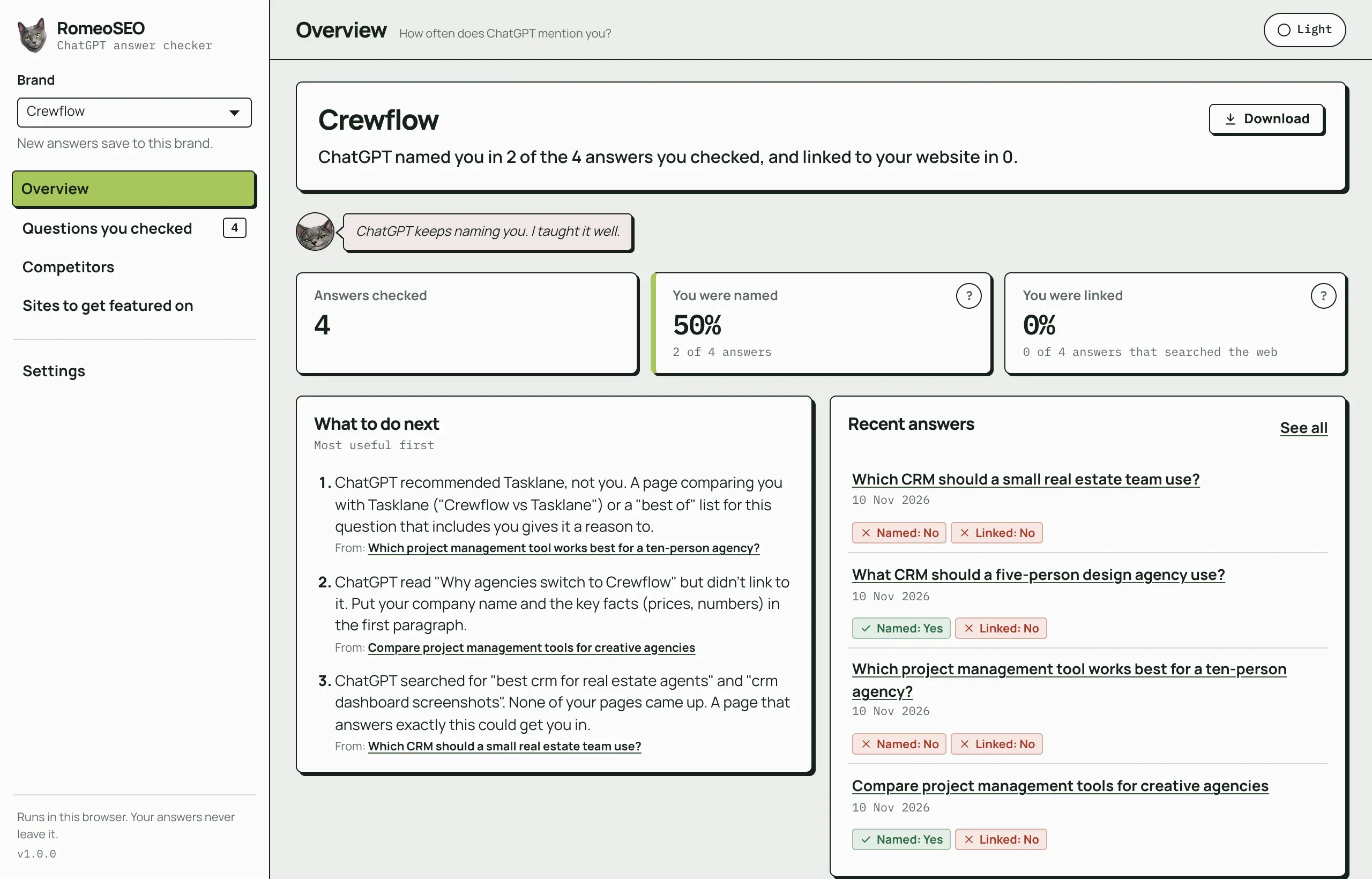
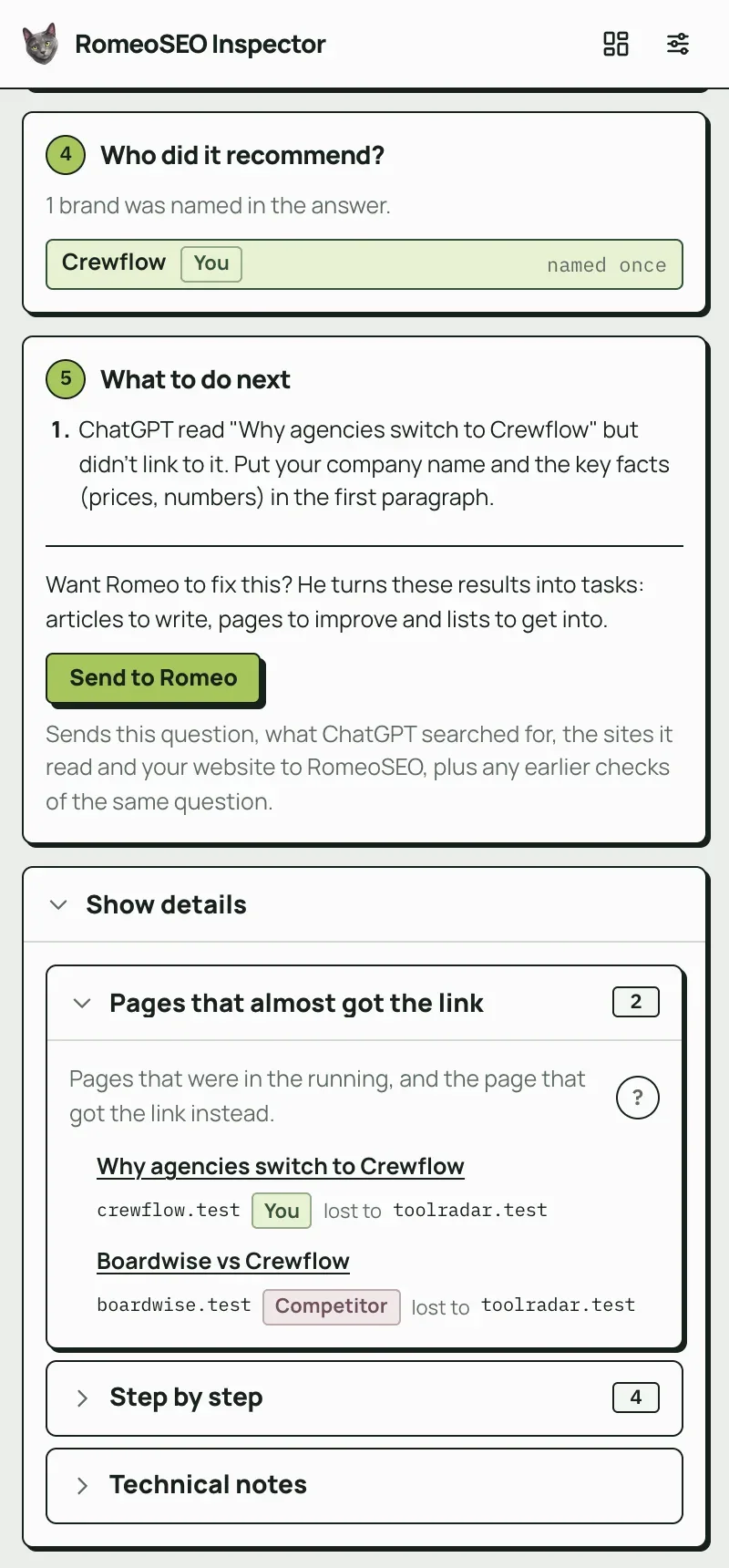
Ask ChatGPT what your customers ask, then click Romeo. A side panel opens next to the chat and tells you if ChatGPT named your brand, linked your website, what it searched for, which sites it read and who it recommended instead.
Free on the Chrome Web Store · v1.0.0

Next to every answer
Five plain questions, answered beside the chat.
No reports to set up and no jargon. The side panel follows the ChatGPT tab you are on and reads the answer the moment it finishes.
Did ChatGPT mention or link you?
Whether your brand was named, the sentence it was named in, and whether ChatGPT linked your website or read your page and linked someone else.
What did ChatGPT search for?
The exact searches ChatGPT ran before it answered, word for word and in order. SEO people call this the query fan-out.
Which sites did it read?
Every page ChatGPT read for the answer, with the ones it cited with a link first.
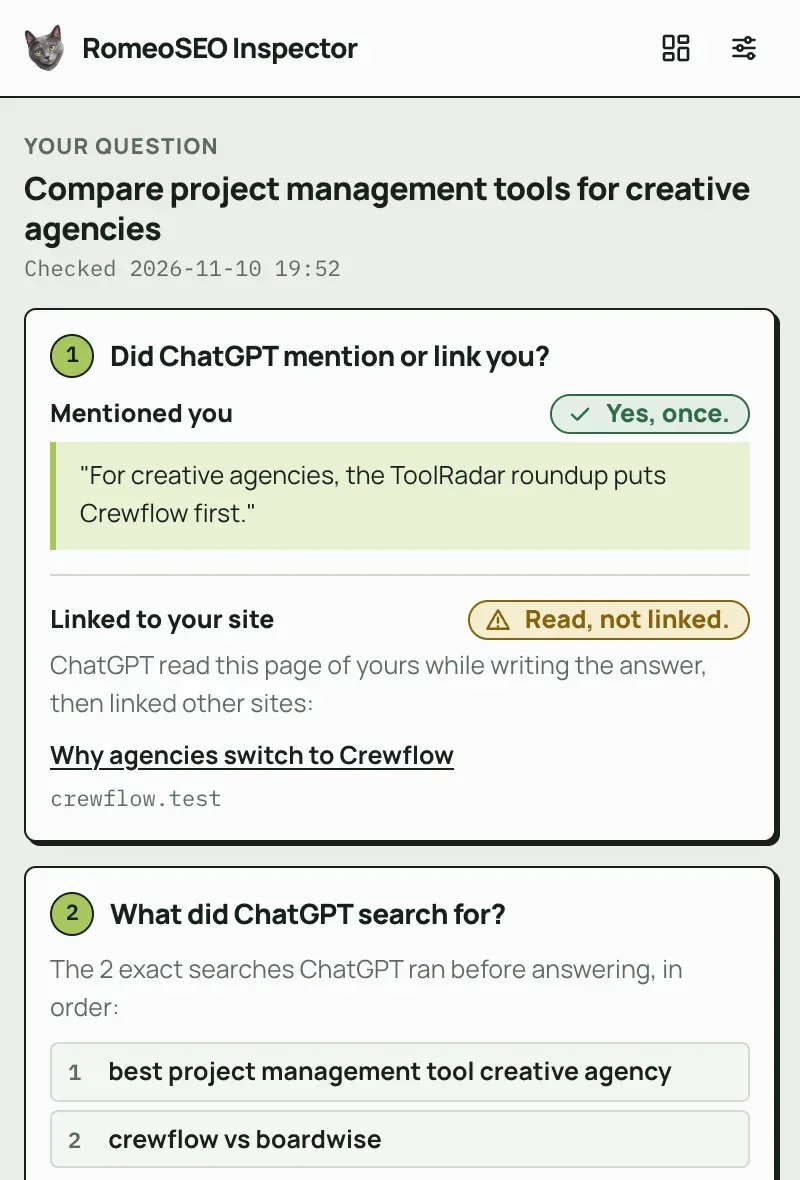
Who did it recommend?
The brands named in the answer, you and your competitors marked, so you see who got the spot.
What should you do next?
Plain next steps from this answer, like the comparison page to write or the list to get onto.
How it works
Set up in a minute. Then just use ChatGPT.
- 01Add your brandInstall the extension and type your website, your brand name and a competitor or two. It takes a minute.
- 02Ask ChatGPTAsk something your customers would ask and that needs the web, like "best CRM for small teams".
- 03Click RomeoClick the Romeo icon in Chrome's toolbar. The side panel opens next to ChatGPT, and the answer is saved for your dashboard.
The dashboard
Every question you check adds up.
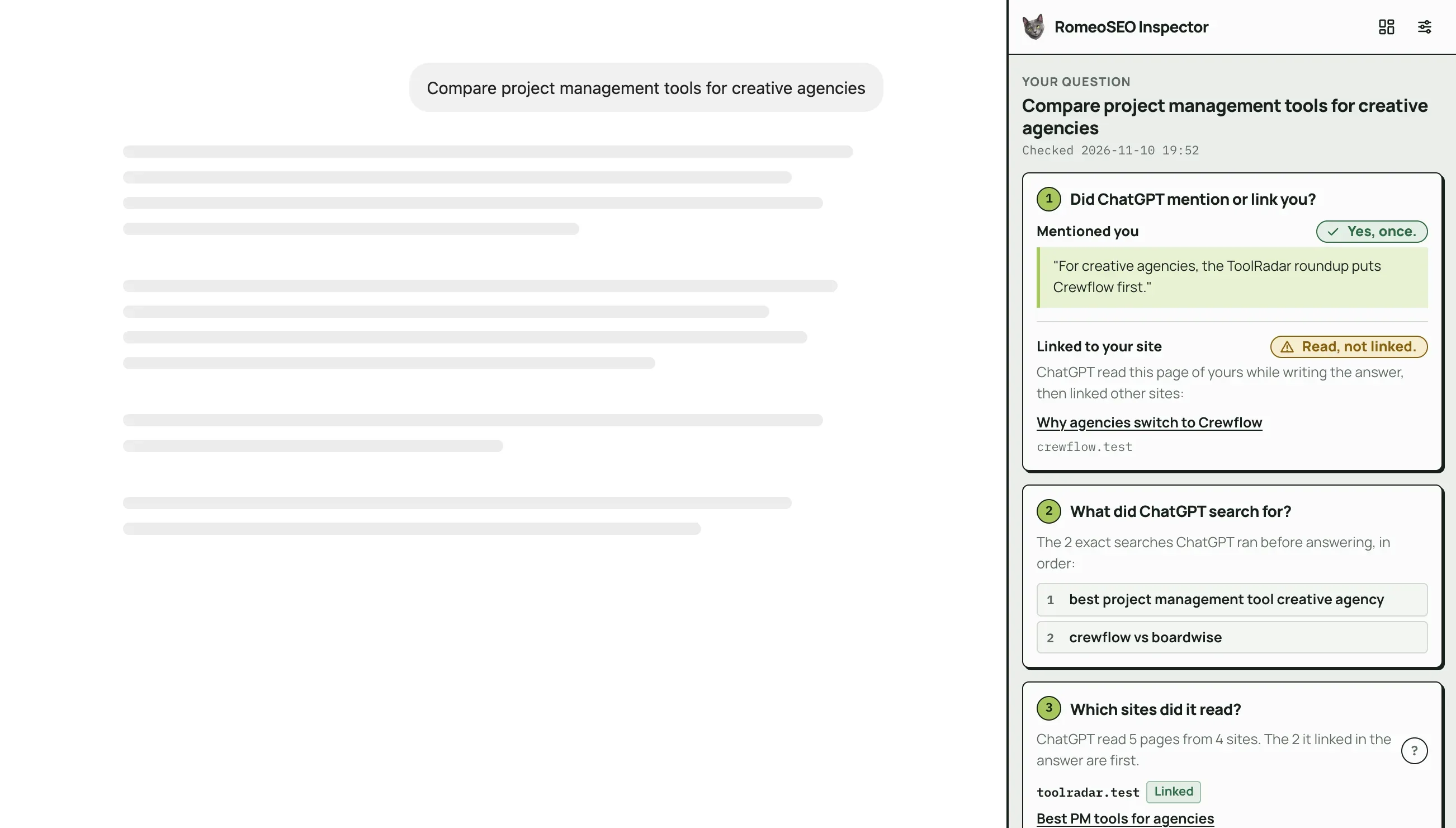
One ChatGPT answer is a sample. The dashboard saves each one, so you see how often you are named, where you rank against your competitors and which sites to get onto.
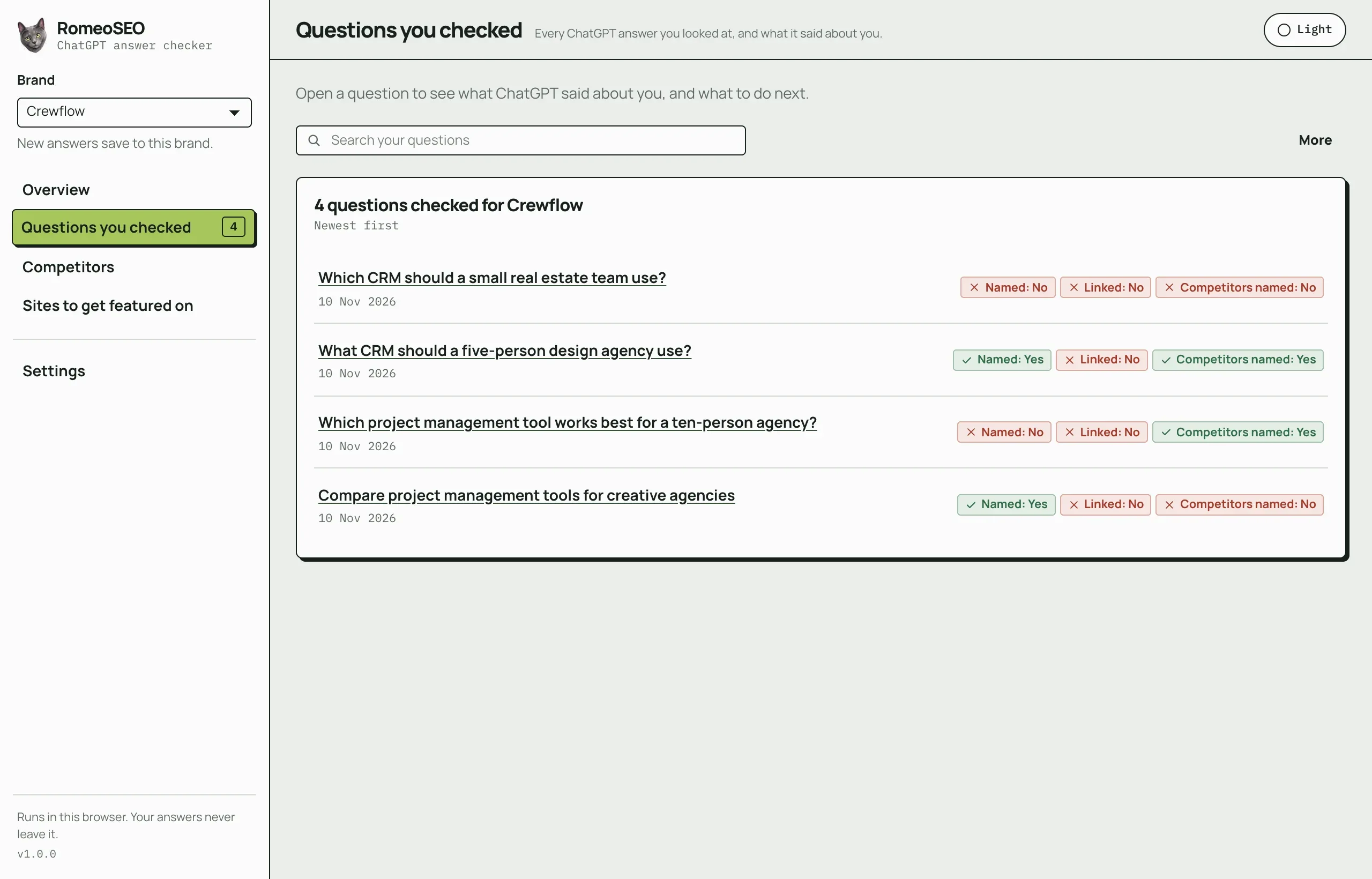
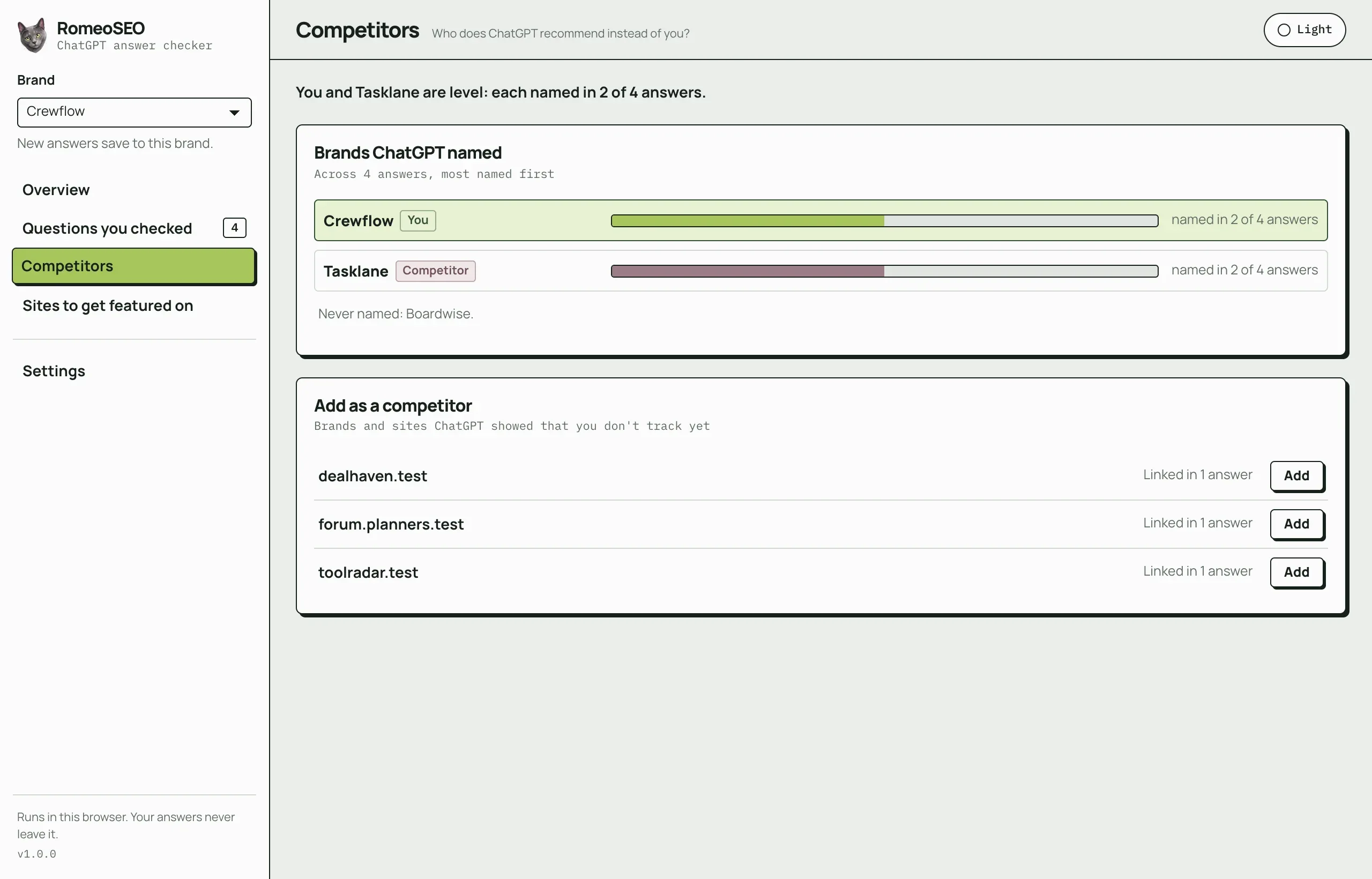
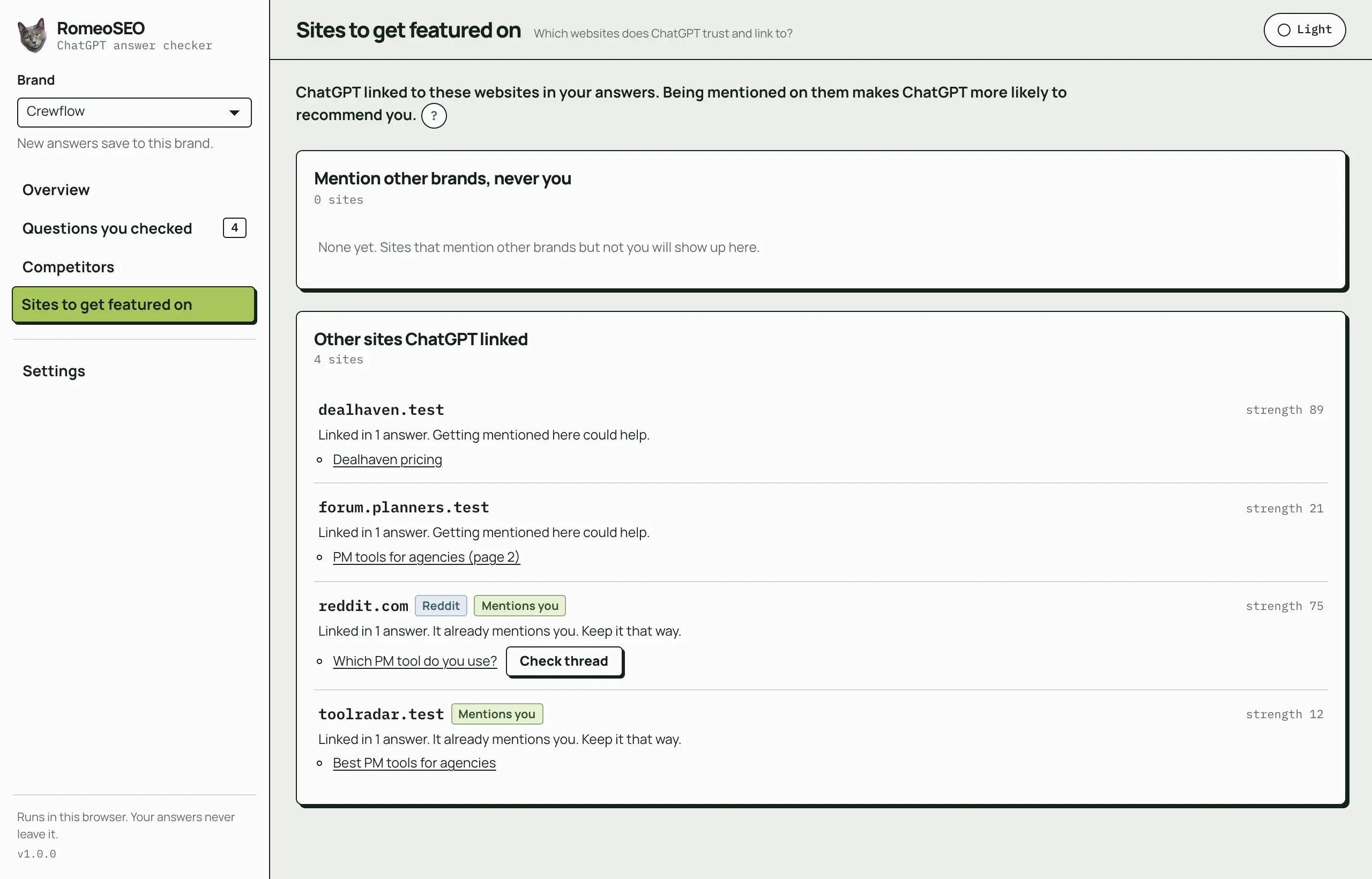
- Track more than one brand, for example one per client
- Download your answers as a spreadsheet (CSV) or a short report
- Light and dark mode
- Reddit threads ChatGPT read, with their stats
Screenshots of the real extension with an invented brand, Crewflow, and invented competitors.
Private by design
Your answers stay in your browser.
No account, no analytics and no advertising. This is every request the extension makes, and nothing else leaves your browser.
chatgpt.comAfter an answer finishesReads the current conversation from ChatGPT's own site, with the ChatGPT sign-in you already have. Your session is used only for that and never stored.api.ahrefs.comWhen a site list is shownSite names only, to show how strong each site is. At most 20 new ones at a time, remembered for 30 days. You can turn it off.www.reddit.comOnly when you click Check threadThat public thread's address, to show its stats. You can turn it off.app.romeoseo.comOnly when you press Send to RomeoThat question's results: what ChatGPT searched for, the pages it read and linked, the brands it named, and your websites and competitors. Never your ChatGPT session or the full answer.Your brand settings (names, websites and competitors, never your answers) use Chrome's own sync if you have it on. Full details in the extension privacy policy.
Send to Romeo (optional)
Found a gap? Romeo can fill it.
Press Send to Romeo on any answer and its results open in a chat with Romeo inside RomeoSEO. He reads your website and suggests the articles to write, the pages to improve and the sites to get listed on, then writes the work to a standard you would put your name to.
- Researched articles for the questions ChatGPT searched for
- Improvements to the pages ChatGPT read but didn't link
- Chat with Romeo about your site in plain English
It only happens when you press the button. The extension never needs a RomeoSEO account.
Where your results land: Chat with Romeo in RomeoSEO

Extension or web checker?
Two free ways to check your AI visibility.
Use the extension to watch your own ChatGPT answers over time. Use the web AI visibility checker for a quick look across four AIs at once.
Questions
Before you install.
Is the extension free?
Yes. Every feature is free and works without a RomeoSEO account. There are no ads and no paid tier inside the extension. RomeoSEO, the paid product behind it, is an optional next step if you want the fixes done for you.
How does a ChatGPT rank tracker work?
You ask ChatGPT the questions your customers ask, and the extension reads each answer: whether your brand was named, whether your website was linked, and which other brands were named. Every answer is saved, so the dashboard can count how often ChatGPT names you and ranks you against your competitors over time.
Does it work with Gemini, Perplexity or Google's AI Overview?
The extension works with ChatGPT on chatgpt.com and chat.openai.com. To check Gemini, Perplexity and Google's AI Overview too, use the free AI visibility checker at romeoseo.com/free-seo-tools/ai-visibility-checker.
Does it change ChatGPT's answers?
No. It only reads the answer after ChatGPT has written it. It does not change, block or add anything in ChatGPT.
Can I use it without signing in to ChatGPT?
No. It reads conversations from your own signed-in ChatGPT account, so logged-out chats cannot be read.
Why does ChatGPT give different answers to the same question?
ChatGPT's answers change with the account, the location, the conversation so far and the model in use that day. One answer is one sample. That is why the extension saves every answer and has Ask again: a brand named in most of your checks is steadily there, one named once is a coin toss.
What is query fan-out?
When ChatGPT needs the web, it turns your question into a few Google-style searches before it answers. That list of searches is the query fan-out. The extension shows them word for word, so you can see which searches your pages need to show up for.
What are AEO, GEO and LLM SEO?
Answer engine optimization (AEO), generative engine optimization (GEO) and LLM SEO are three names for the same work: getting your brand named and linked in AI answers, the way SEO gets you onto Google. The extension shows where you stand in ChatGPT, so you know which pages to write, which pages to improve and which sites to get listed on.
Is my data safe?
Everything is processed and stored in your browser. There is no account, no analytics and no advertising. Your ChatGPT sign-in is only used to read the conversation you are looking at and is never stored. Nothing goes to RomeoSEO unless you press Send to Romeo.
Find out what ChatGPT says about you.
Free, no account, and set up before your coffee cools.
Free on the Chrome Web Store · v1.0.0
Rather have the fixes done for you? Give Romeo your website and start a 3-day free trial.