
Romeo’s content gap analysis
- Starts from
- One of your pages
- Answers
- What is this page missing compared with the pages that beat it?
- You get
- A to-do list: what to add, where it goes, what to do first
- Next step
- Romeo can write the changes for you
See what the pages above yours on Google cover that yours doesn’t, and exactly what to add to catch up.
Choose a page you want higher on Google. Romeo already knows the searches it shows up for.
He compares your page with the results that beat it, section by section.
What to add, where it goes, what to do first, and ideas the other pages missed.
Card required for trial. See a sample report · Plans and pricing
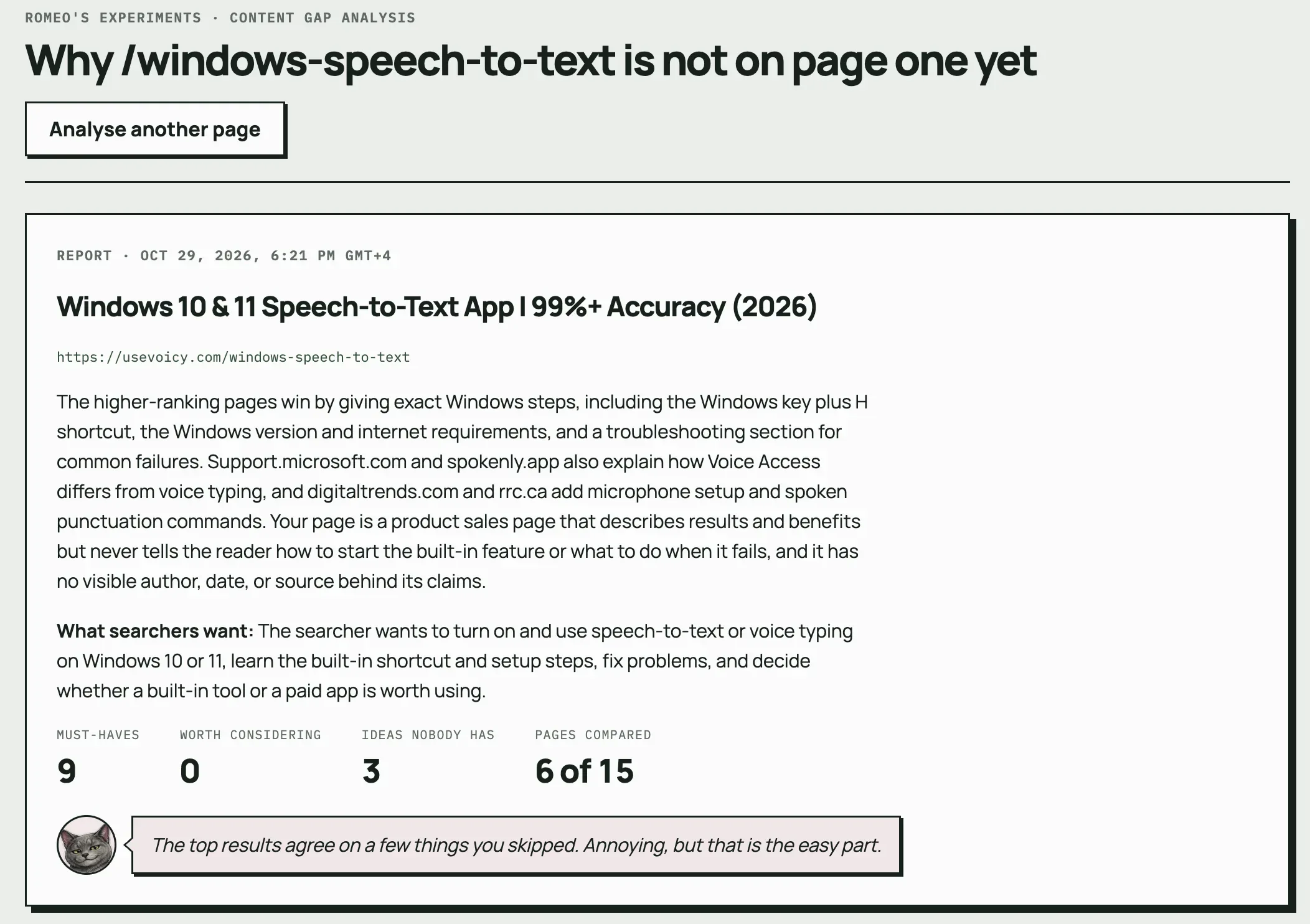

A real report on usevoicy.com, one of our own websites.
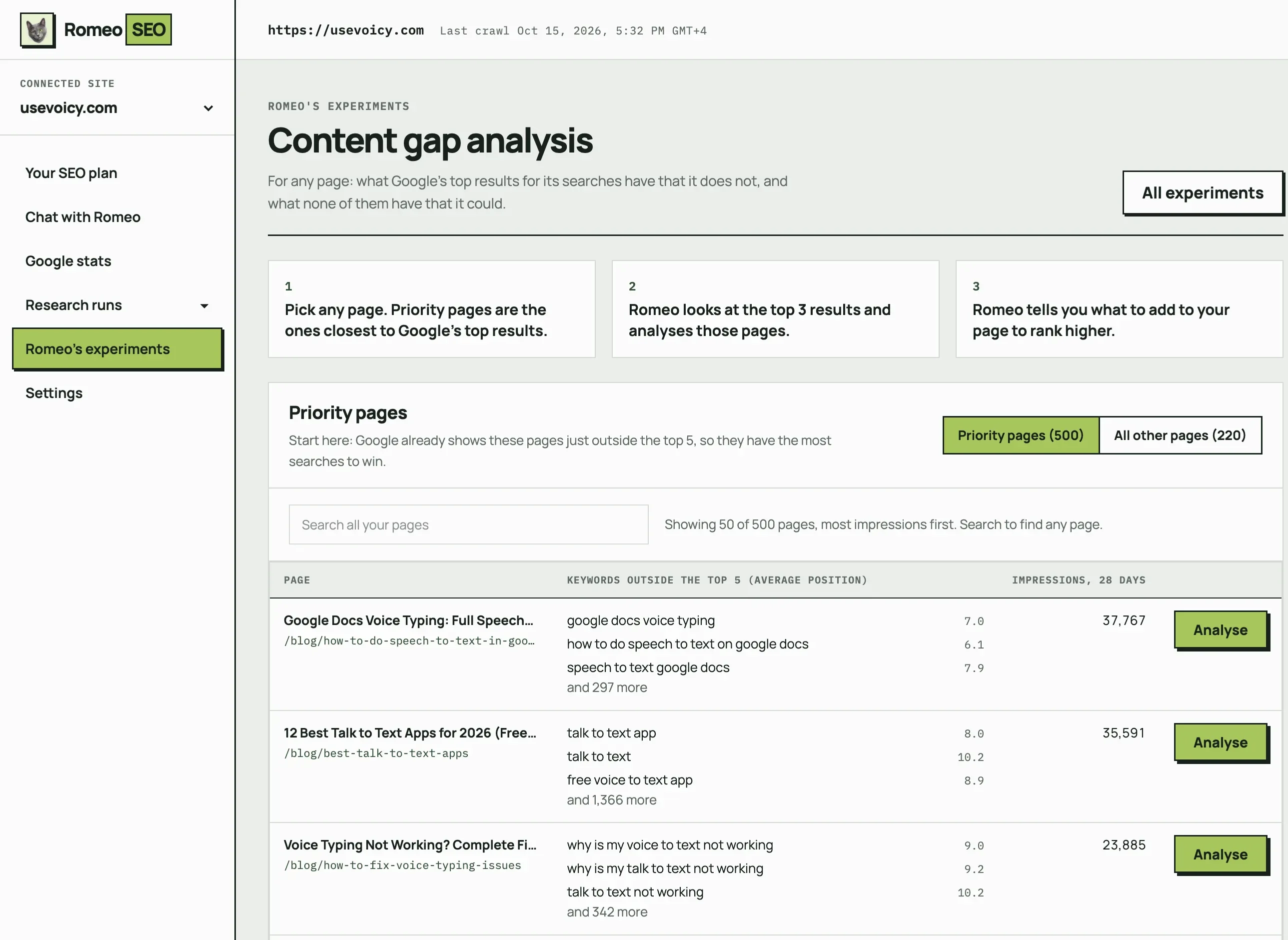
Step 1
Romeo lists the pages Google already shows just outside its top 5, with the searches they show up for and how often. Those have the most to win. Any other page on your site can be analysed too.
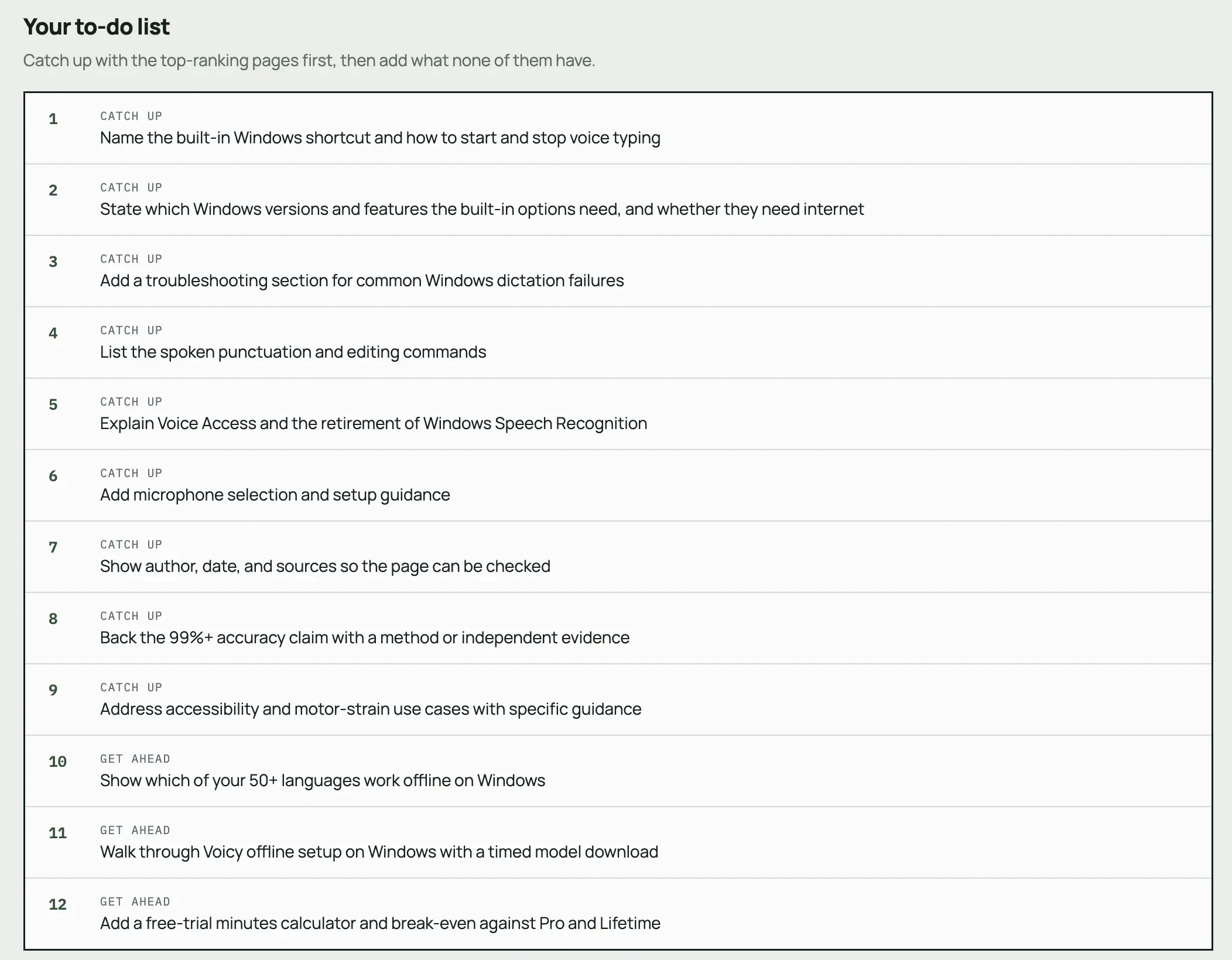
Inside the report
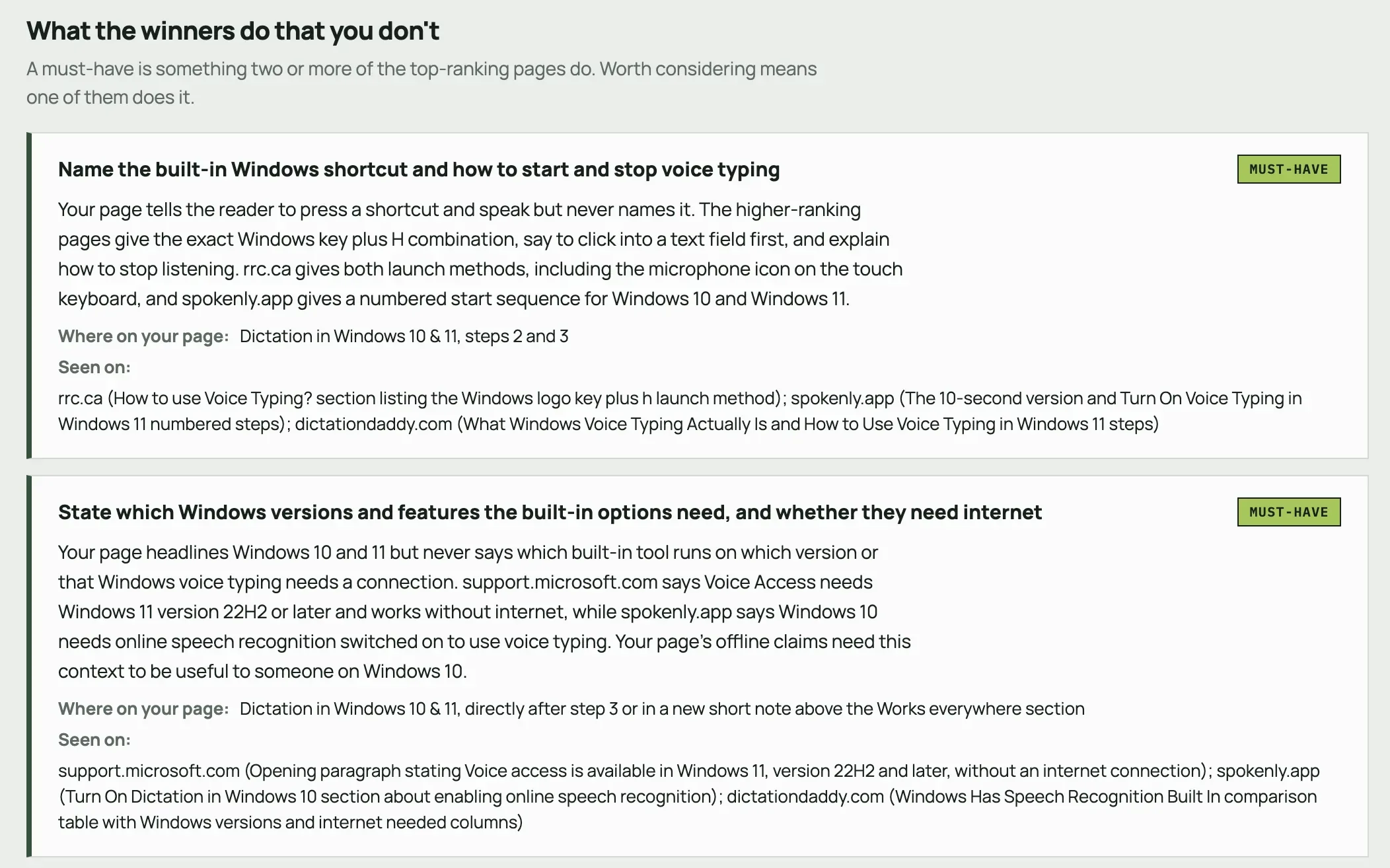
Every analysis reads the top pages in full and tells you why each finding matters, where it goes and what to leave alone.
How many must-haves and new ideas Romeo found, how many pages he compared, and what searchers want from this search.
Every finding names the part of your page it belongs in and which of the top pages already do it.
The things your page does well, so you know what to keep.
Each compared page with its length, and why any page was left out.
If a page was cut short or something couldn’t be checked, the report says so instead of guessing.
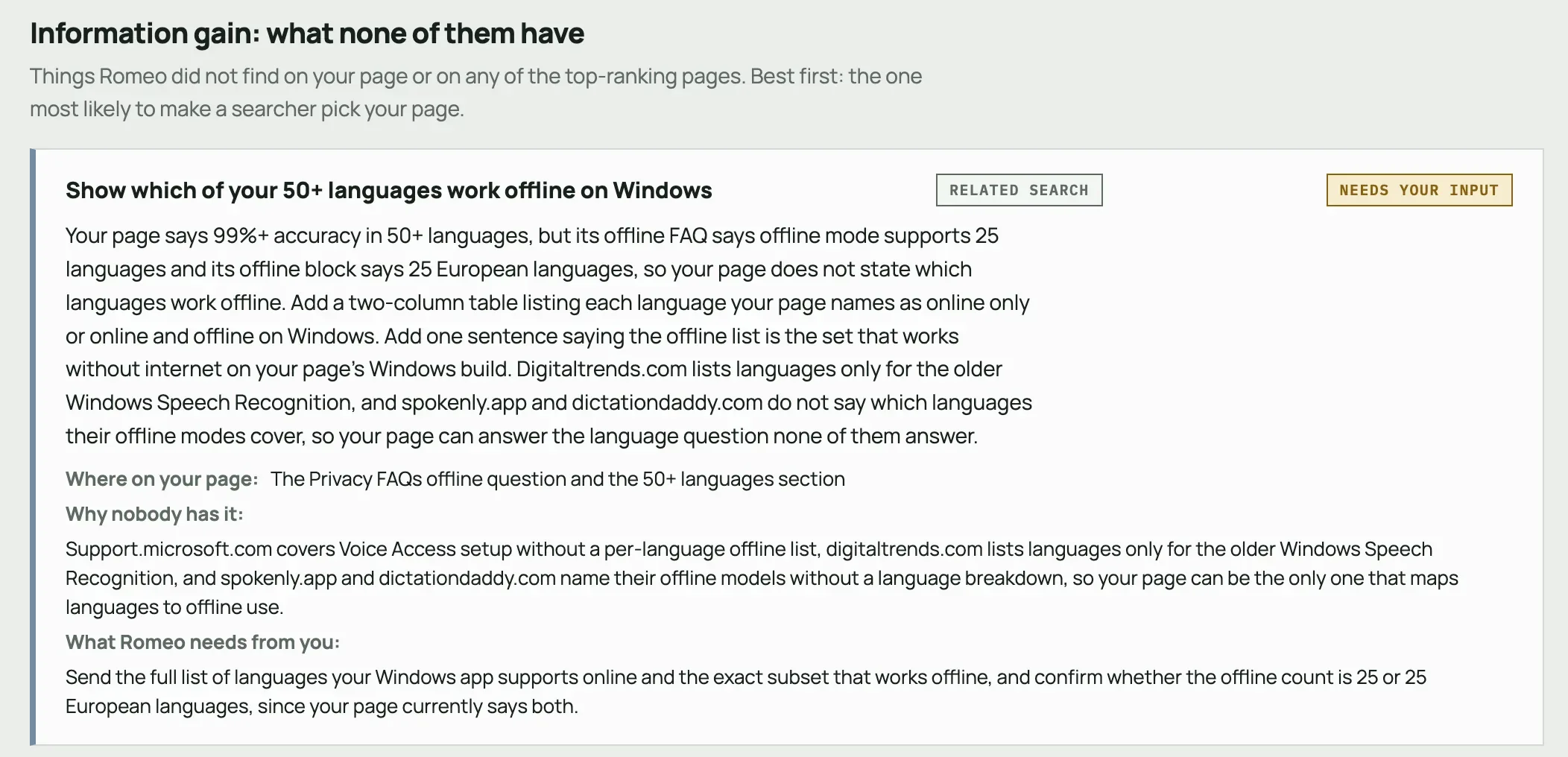
Ideas nobody has
Copying the top pages only gets you level with them. Romeo also looks for what none of them have, the reason a searcher would pick your page. Every idea is one of five kinds.
A question searchers ask that none of the top pages answer.
For a Windows speech-to-text page: Does Windows voice typing work without internet?
A nearby search Google connects to this one, with no good answer on the top pages.
For a Windows speech-to-text page: Which languages work offline on Windows
Facts from your own business that no competitor can copy. Romeo says what he needs from you.
For a Windows speech-to-text page: How you measured your 99% accuracy claim
Proof you have actually used the thing: your photos, tests and measurements.
For a Windows speech-to-text page: A timed walkthrough of the offline setup
The same facts in a form that is quicker to use than what the top pages offer.
For a Windows speech-to-text page: A table of spoken punctuation commands
The manual way
You can do this yourself with Search Console and a browser. Step 3 is the slow part. Romeo does steps 2 to 4 for you.
Read the full step-by-step guideIn Google Search Console, look for a page that gets seen a lot but clicked little, or one sitting just off the first page.
Open the page in Search Console’s Performance report and note its main searches. These tell you what readers expect.
Search the main one and read the top 3 to 5 results. List the questions, sections, examples and tables they have that you don’t.
Add what readers expect where it fits on your page. Then add something none of them have, like your own photos, numbers or experience.
Content gap vs keyword gap
Competitor gap tools like Ahrefs Content Gap and Semrush Keyword Gap compare whole websites. Romeo compares one page with the pages beating it, so you know what to change on it.
Want the keyword side too? Romeo’s weekly keyword research finds new topics to write about, and the free SEO competitor analysis tool shows the searches your competitors have that you don’t.
From report to finished page
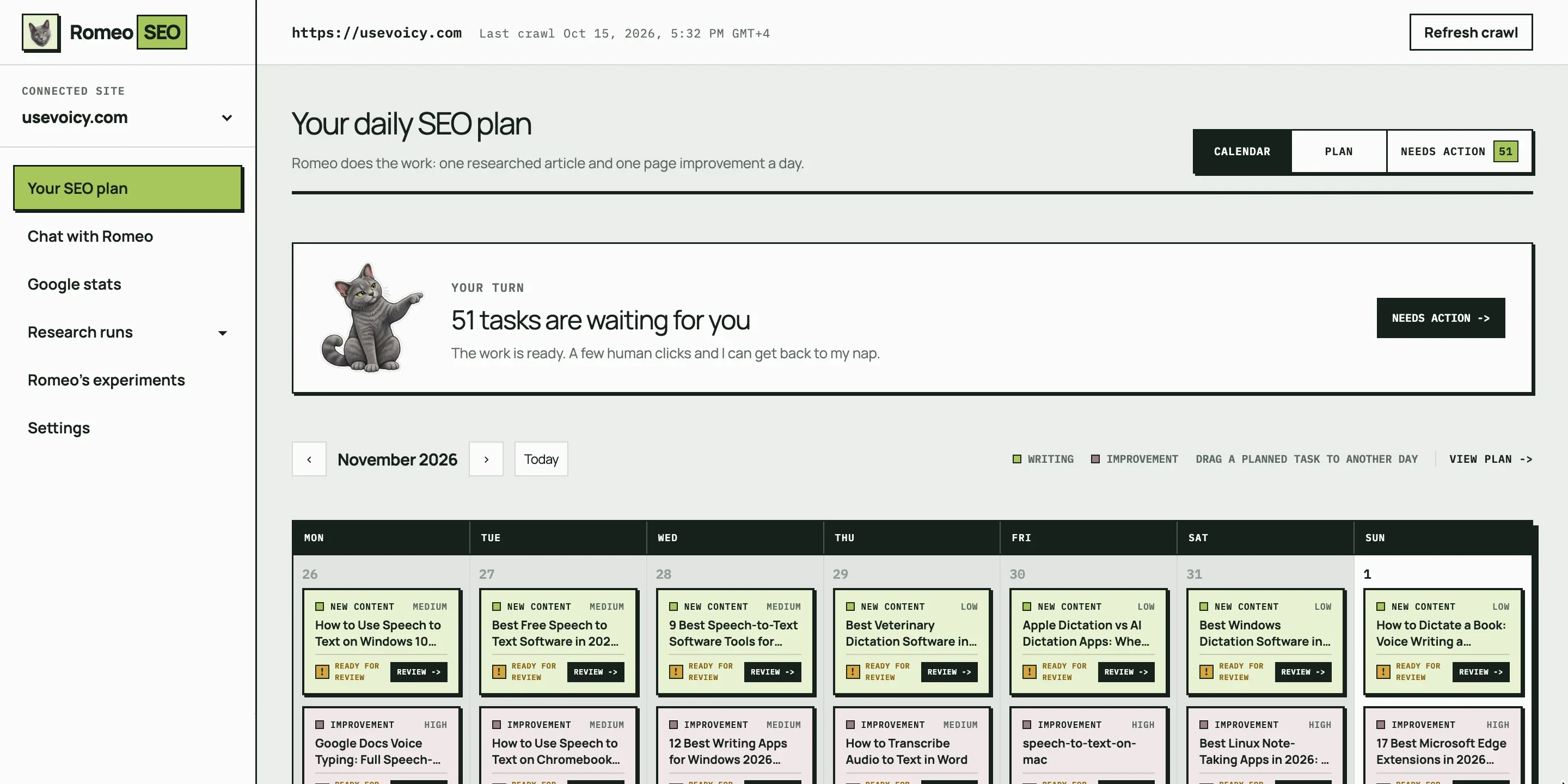
Press “Let Romeo make these changes” and Romeo writes the new sections, checks them, and notes why each one is there.
Dictation in Windows 10 & 11
Click into any text box, then press the Windows logo key + H. Voice typing opens and starts listening. To stop, press the same keys again or select the microphone.
Why Romeo added it: rrc.ca, spokenly.app and dictationdaddy.com all name the shortcut; this page didn’t.

Your to-do list becomes the brief for one page improvement. It runs on your plan’s daily schedule.
As a GitHub pull request, a prompt for Claude Code or Cursor, or step-by-step instructions.
Once it’s live, he tracks the page’s Google numbers and tells you how it did in your weekly email.
Questions about a report? Ask Romeo in chat, like “why does this page rank below the review site?” He answers from your own Google data and live results. How Chat with Romeo works
I spent a full year building the SEO system that took one of my own products past $10,000 a month in recurring revenue. Romeo is that system, packaged so you can point it at your site instead of rebuilding it yourself.
Kourosh Ghaffari, founder, very hot man


Content gap analysis is included in every plan, with keyword research, a new article and a page improvement every day. Try it free for 3 days, then $69 a month per site. Cancel any time.

Monthly
Limited time offerRegular price $149Limited time offer $69/ month
Per site. Billed every month. Cancel any time.
Researched against what already ranks, written, edited and illustrated every month.
We rewrite existing pages and fix issues every day.
Go through your site together and plan the month ahead.
Real search results decide what is worth writing about.
In the app, ChatGPT or Claude. He answers from your Google data and suggests tasks you add in one click.
Then $69 every month, per site.
Card required. Cancel before your trial ends to avoid a charge.

Managed
$300/ month
Run by Kourosh, the founder of RomeoSEO.
Per site. Billed every month.
Kourosh handles the SEO on your site from start to finish.
Go through the results together and agree on what comes next.
No monthly cap. Your site gets as much new content as it needs.
Every existing page that can rank better gets reworked.
Talk through your site first.
Billing is set up after the call, once the plan fits your site.
Up to 5 sites per account, each billed on its own. Compare the plans
It finds topics, answers or formats missing from your content. Romeo compares an existing page with the Google results for searches your page already shows up for, then shows what you could add and where it fits.
A keyword gap analysis compares whole websites to find searches your competitors show up for and you don’t. It is good for finding new topics. A content gap analysis starts with one page and asks what readers find on the pages above yours that your page leaves out. It is how you improve a page you already have.
Pages that already show up on Google but rarely get clicked, and pages sitting just off the first page. They are close to doing well, so filling their gaps tends to pay off fastest.
Connect Google Search Console, then choose a page that shows up in Google searches. In your Romeo workspace, open Romeo’s experiments, then Content gap analysis. It is included in every plan and in the 3-day free trial.
No. Running it gives you a report. Press “Let Romeo make these changes” and Romeo turns the findings into a page improvement with the exact new text. You can send it to your site as a GitHub pull request, paste it into Claude Code or Cursor as a prompt, or follow the steps yourself.
The full analysis comes with a plan or the free trial. To start for free, the on-page SEO checker grades one page against its main search, and the SEO competitor analysis tool shows the searches your competitors have that you don’t.
No. It compares your page with Google results. A page that answers a topic fully is also easier for AI assistants to understand, but this tool does not check AI answers. The free AI visibility checker does.
Connect your site, run a content gap analysis, and see what your page is missing.