
RomeoSEO7 min read
How to Check Who Links to Your Website
Find your incoming links with Google Search Console, Bing, Ahrefs Webmaster Tools and free checkers, then learn which backlinks to act on and which to ignore.
Summary of the Article
You can check who links to your website with Google Search Console's Links report, then fill the gaps with Bing Webmaster Tools, Ahrefs Webmaster Tools, and free backlink checkers. Search Console is free and uses Google's own data, but it shows a sample and never tells you if a link is nofollow. Once you have a list of linking domains, most of the value is in deciding what's worth acting on, and most of it isn't.
- Search Console Links report: the starting point for your own site; sample data only.
- Bing Webmaster Tools and Ahrefs Webmaster Tools: second sources with link-type details.
- Free checkers (Ahrefs, Semrush, Moz, Seobility): best for checking other domains like competitors.
- Merged referring-domain list: the deliverable that makes the data actionable.
What an incoming link is, and why domains matter more than links
An incoming link (also called a backlink) is any link from another website to a page on yours. If one site links to you three times, that's three backlinks but only one referring domain.
When you check incoming links, count referring domains first. A site with 10,000 backlinks from two domains usually has less ranking strength than one with 300 backlinks from 200 different domains. Search engines treat each domain as an independent vote, so the number of distinct sites linking to you is the number most worth tracking over time.
Step 1: Read the Links report in Google Search Console
This is the only free source of backlink data that comes from Google itself, so start here for your own site.
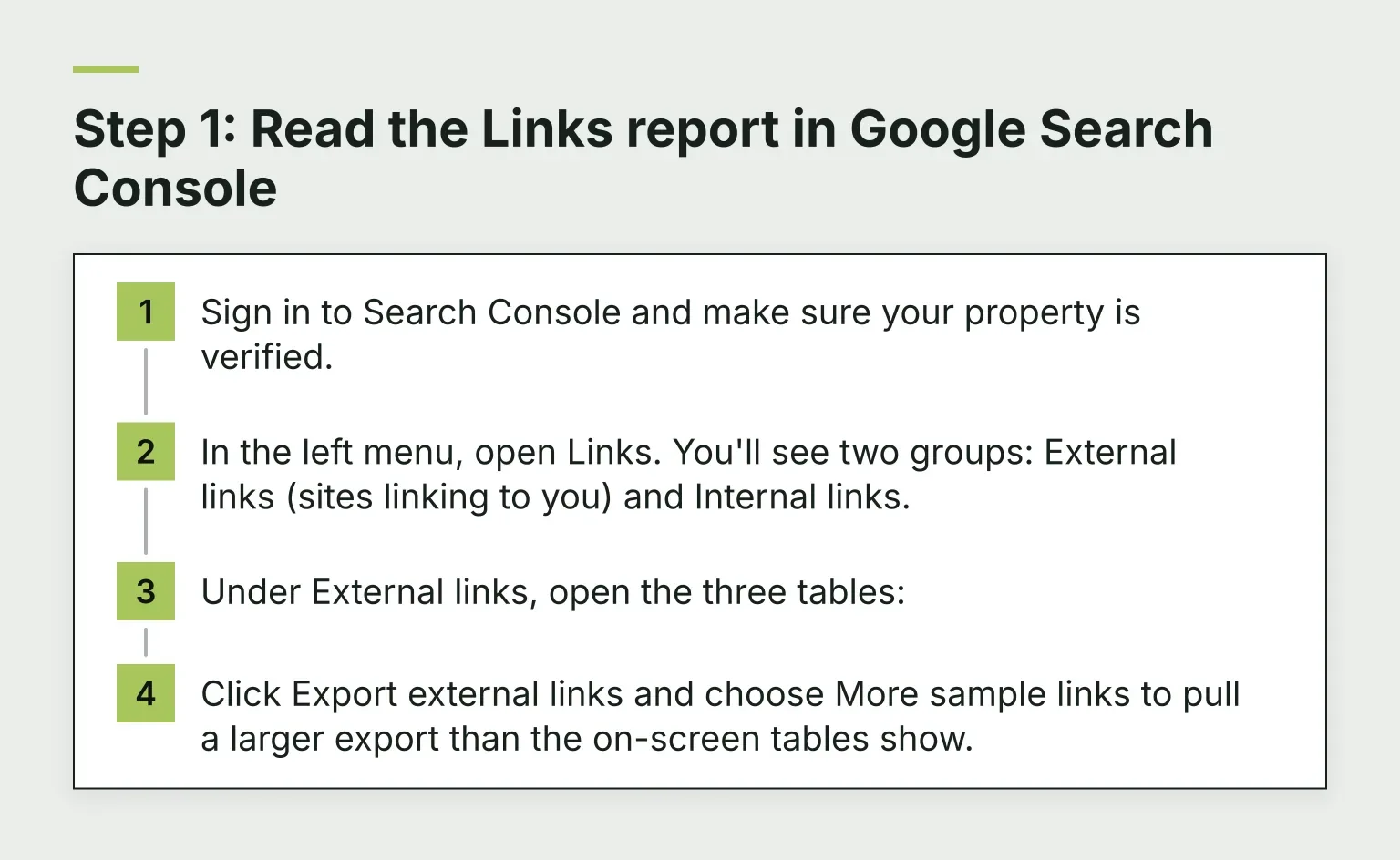
- Sign in to Search Console and make sure your property is verified.
- In the left menu, open Links. You'll see two groups: External links (sites linking to you) and Internal links.
- Under External links, open the three tables:
- Top linked pages: which of your pages collect the most links.
- Top linking sites: which domains link to you most, grouped by root domain (example.com, not blog.example.com).
- Top linking text: the anchor text other sites use when linking to you.
- Click Export external links and choose More sample links to pull a larger export than the on-screen tables show.
Google documents the report's exact limits on its Links report help page. Knowing them changes how you read the data, so here's the short version.
What Search Console won't tell you
- It's a sample. The on-screen tables show at most 1,000 rows, and exports cap out at 100,000 rows. You'll never see the complete picture.
- Links are grouped by root domain. Useful for a domain count, but you can't see the exact URL each link came from.
- No follow or nofollow information. Google deliberately doesn't flag link types here, so you can't tell follow from nofollow in this report.
- Removed links can linger. Links that a site deleted may still appear for a while.
Step 2: Add a second source for link types and coverage
Because Search Console hides follow status and samples the data, add one or both of these before drawing conclusions.
- Bing Webmaster Tools (bing.com/webmasters): free, and Bing's inbound links report lists linking pages from its own crawl. It's a second search engine's view, which helps you spot links Google's sample missed.
- Ahrefs Webmaster Tools (ahrefs.com/webmaster-tools): free for sites you own. Verify your domain and you can see far more links than Search Console's sample, including each link's type: follow, nofollow, sponsored, or UGC.
Step 3: Check any domain with free backlink checkers
To check SEO backlinks for a site you don't own, like a competitor, you need a third-party checker. Each has limits, and the caps change often, so treat these numbers as a starting point and check each vendor's page before you rely on them.
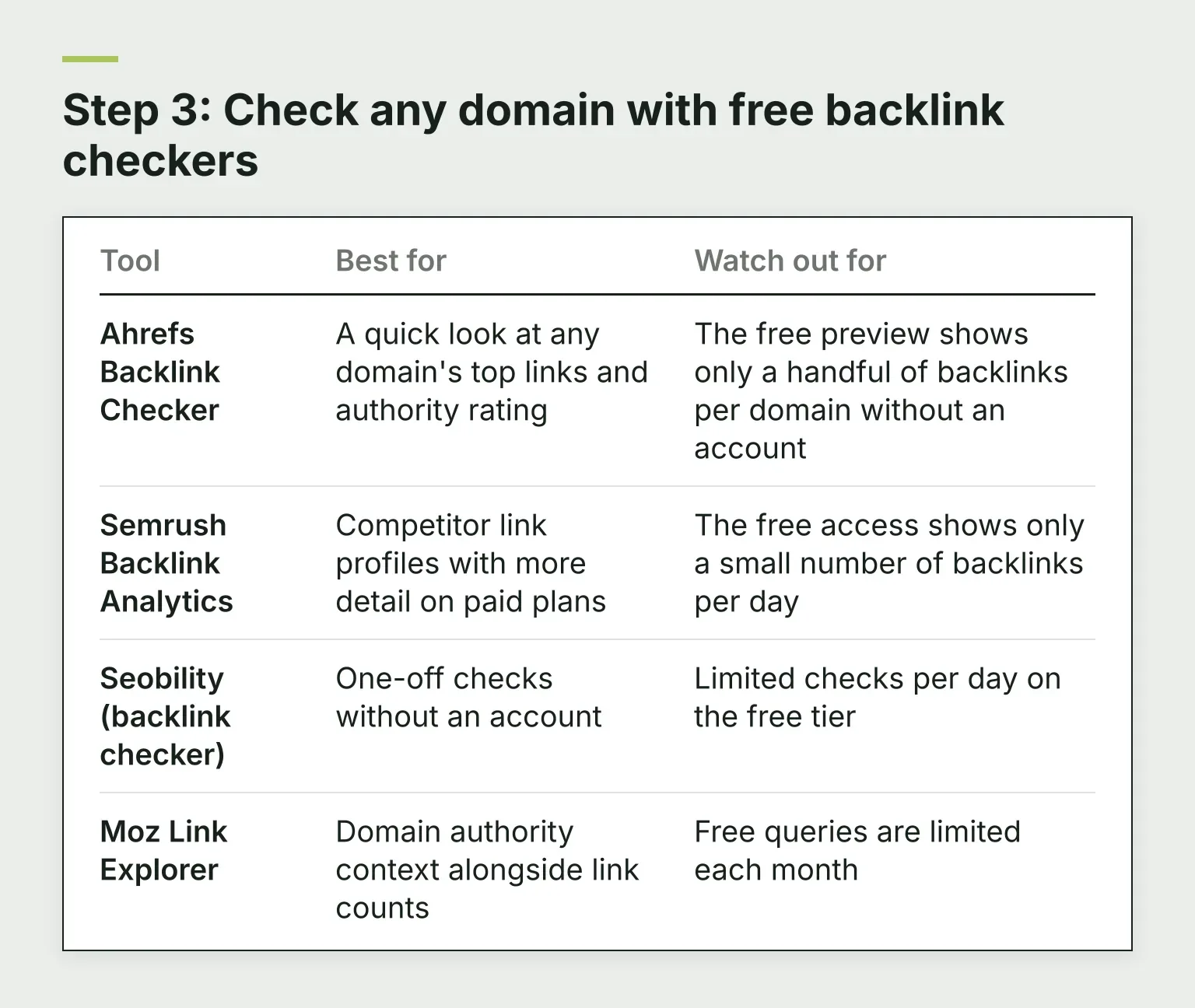
| Tool | Best for | Watch out for |
|---|---|---|
| Ahrefs Backlink Checker | A quick look at any domain's top links and authority rating | The free preview shows only a handful of backlinks per domain without an account |
| Semrush Backlink Analytics | Competitor link profiles with more detail on paid plans | The free access shows only a small number of backlinks per day |
| Seobility (backlink checker) | One-off checks without an account | Limited checks per day on the free tier |
| Moz Link Explorer | Domain authority context alongside link counts | Free queries are limited each month |
For a competitor, run their domain through one checker, note their top linking domains and most-linked pages, and stop. Tool counts will never match Search Console or each other, and chasing exact numbers is wasted effort.
Step 4: Read the results
Anchor text
Open the Top linking text table and look for two patterns. Natural anchor text includes your brand name, your URL, or plain phrases like "this guide." That's normal and healthy.
What stands out is keyword-stuffed anchors: dozens of different sites all linking with "best cheap running shoes" when nobody names your brand. A cluster of identical commercial anchors from random domains often points at bought links. It's not always a problem, but it's the single clearest signal in the report worth a closer look.
Follow vs nofollow
A nofollow link carries a rel attribute that Google treats as a hint rather than a directive, along with the sponsored and UGC link types introduced in 2019. In practice, most natural link profiles contain a mix, and Google may count nofollow links for discovery and ranking purposes anyway.
This is why the follow/nofollow split matters less than people expect. Search Console can't even show you the split. If you want it, get it from Ahrefs Webmaster Tools or a checker, and then don't over-read it: a site with 80% nofollow links can still rank perfectly well.
Step 5: Merge everything into one referring-domain list
Export from Search Console, Bing, and Ahrefs Webmaster Tools, paste each list into one spreadsheet with a column for the source tool, and delete duplicate domains so each referring domain appears once. Add columns for the linked page and anchor text where you have them.
The result is a single list of every domain that links to you, which is the actual deliverable. Any backlinks SEO checker gives you fragments; the merged list is what you make decisions from.
What's worth acting on
- Important pages with no links. If your top service page has no referring domains while your 2021 blog post has thirty, that's the clearest priority in the whole list. Build links to the pages that matter.
- Links pointing at dead URLs. If the target URL no longer exists, every link is wasted. Redirect the old URL to the closest live page. Our free bulk redirect checker verifies the hops on old URLs during migrations, and the Lost URL Finder digs up pages that now 404.
- Unknown spammy domains. A burst of links from irrelevant foreign-language sites you never touched is worth investigating, especially if rankings dropped at the same time.
- Disavow as a last resort. Google's disavow tool exists mainly for manual penalties or clear paid-link schemes. For most sites, ignoring junk links is the right move; Google's own guidance is to disavow only when you're confident the links are causing harm.
What not to act on
- Tool-count mismatches. Ahrefs says 4,200 links, Search Console says 1,900. That's sampling and crawl differences, not a problem.
- Your follow/nofollow ratio. There's no target number, and Google treats these attributes as hints anyway.
- One unusual anchor. A single odd anchor text from one small site is noise.
- Authority score swings. Third-party scores move when vendors update their models, not because your site changed.
Once you know which pages earn links and which are drifting, the next bottleneck is usually deciding what to fix first. That's the same prioritization problem RomeoSEO works on, using your pages, rankings, and connected Search Console data to flag what's losing ground and write the fixes. Start your free trial on romeoseo.com if you'd like help turning the list into tasks. And when you have a short list of specific links to verify, the free Backlink Status Checker checks whether each link is still live.
Related reading
- How to Track Keyword Rankings in Search Console: the monitoring side of the same workflow.
- Free Website Authority Checker: weigh the domains on your merged list, up to 20 at a time.