
RomeoSEO10 min read
Semrush vs SEO PowerSuite (2026): Which Fits You
Semrush vs SEO PowerSuite compared job by job: pricing model, renewals, data freshness, rank tracking limits, and which tool fits your site and budget.
Summary of the Article
Semrush and SEO PowerSuite do the same core jobs, but they work very differently. Semrush is a browser-based subscription suite built on vendor-hosted data; SEO PowerSuite is a set of four desktop apps that collect their own data and bill yearly. RomeoSEO is a different kind of option entirely: it works from your own Search Console data to write the fixes, not more dashboards to read.
- RomeoSEO: the fit if your real problem is not analyzing data but getting fixes shipped; see RomeoSEO pricing.
- Semrush: best if you want browser access, team sharing, and strong competitor research; starts at $139 per month, or $117.33 per month billed annually.
- SEO PowerSuite: best if you want the lowest entry price and unlimited keyword tracking, and you don't mind working in installed desktop apps; starts at $349 per year with no monthly option.
If you want a quick verdict: cost-conscious solo owners usually get more tracking per dollar from SEO PowerSuite, teams that live in the browser and study competitors get more from Semrush, and owners who want changes made rather than more dashboards should look past both. Here is how the two break down, job by job.
Semrush vs SEO PowerSuite at a Glance
| RomeoSEO | Semrush | SEO PowerSuite | |
|---|---|---|---|
| What it is | SEO software that writes articles and page fixes from your own Search Console data | Browser-based SEO suite with vendor-hosted data | Four desktop apps that collect data on demand |
| Pricing model | Monthly per site | Monthly or annual subscription | Annual licence only, no monthly billing |
| Starting price | See pricing page | $139 per month (Pro, cheaper billed annually) | $349 per year (Professional) |
| Free option | 3-day trial | Limited free account plus a 7-day trial | Permanent free edition (1 project, 500-URL crawl cap) |
| Keyword tracking limits | Based on your connected Search Console data | 500 keywords on Pro, up to 5,000 on Business | Unlimited on every paid plan |
| Where work happens | Finished articles and fixes sent to your site | Dashboards and reports | Your desktop |
| Best fit | Small teams who want fixes, not dashboards | Teams, agencies, competitor research | Budget buyers, unlimited tracking, desktop control |
Prices above were read from Semrush's pricing page and SEO PowerSuite's pricing page. Both vendors change pricing now and then, so check their pages before you buy.
SEO PowerSuite's homepage. For identification only, not proof of features or prices.
Semrush: A Browser Suite Built on Vendor-Hosted Data
Semrush runs in your browser. Semrush hosts a huge database of crawled keywords, backlinks, and rankings, and every feature is a dashboard you log into from anywhere. Your colleagues, clients, and contractors can all use the same account without installing anything.
That architecture explains both its price and its strengths. You pay for the database, so competitor estimates for a site you have never touched are there the moment you search. And because nothing is installed, sharing is trivial.
SEO PowerSuite: Four Desktop Apps That Collect Data on Demand
SEO PowerSuite is a set of four programs you install on your computer:
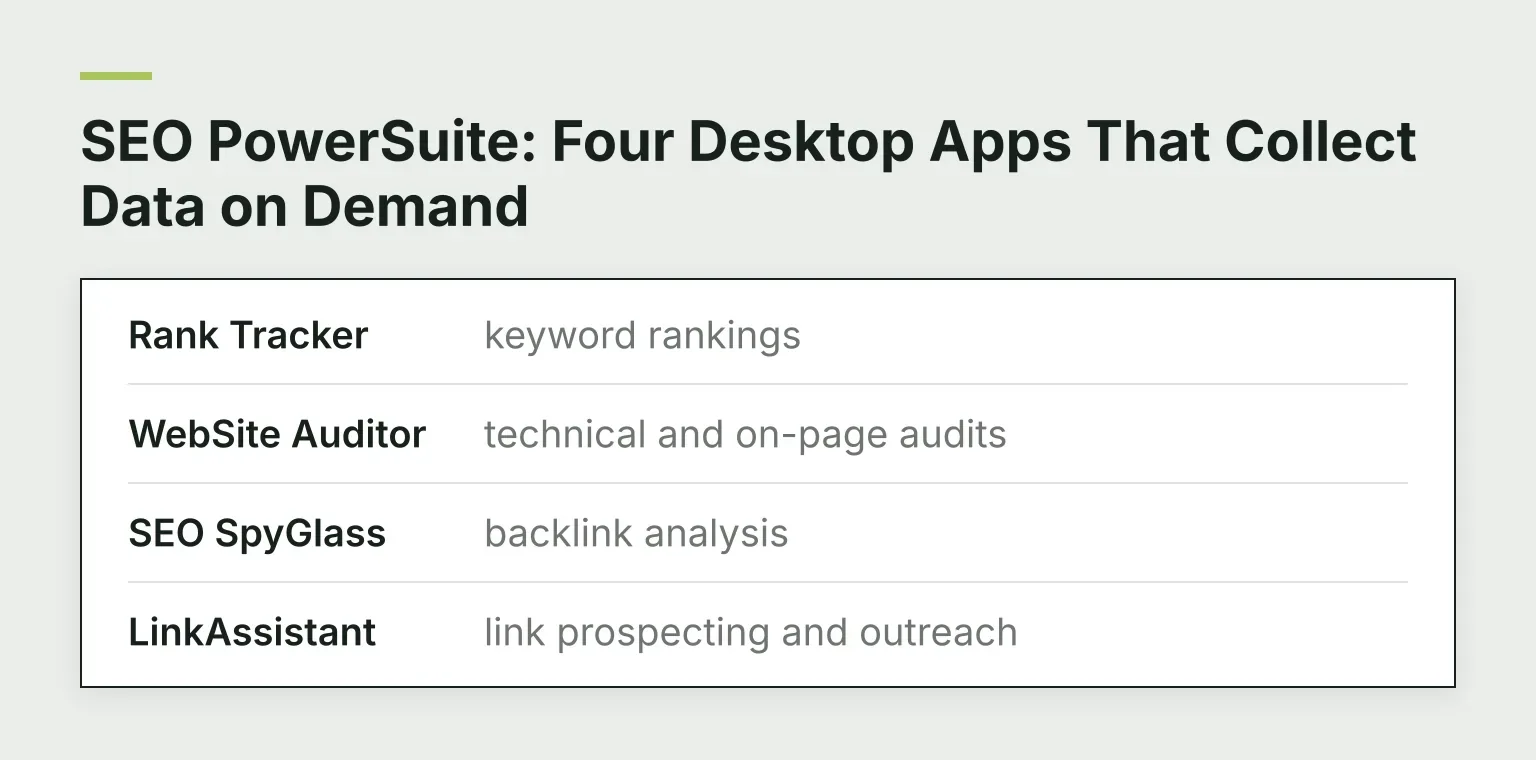
- Rank Tracker: keyword rankings
- WebSite Auditor: technical and on-page audits
- SEO SpyGlass: backlink analysis
- LinkAssistant: link prospecting and outreach
PowerSuite pulls its data on demand, running checks from your machine when you click. It offers optional cloud storage, but the work still happens locally. A practical consequence: the laptop that is off produces no data. The upside is you decide when and how often data is collected, and the apps display the index sizes they actually used rather than a fixed vendor database.
This structural difference drives most of the tradeoffs below.
Pricing: Subscription vs Annual Licence
Semrush has three main SEO plans. Pro is $139 per month ($117.33 per month billed annually), Guru is $249, and Business is $499. Limits scale with the tier: 500 keywords tracked on Pro, 1,500 on Guru, 5,000 on Business, and monthly crawl budgets of 100,000, 300,000, and 1,000,000 pages. Semrush documents these limits on its plan limits page.
SEO PowerSuite has no monthly option at all. Its pricing FAQ states you are billed annually for the plan you buy:
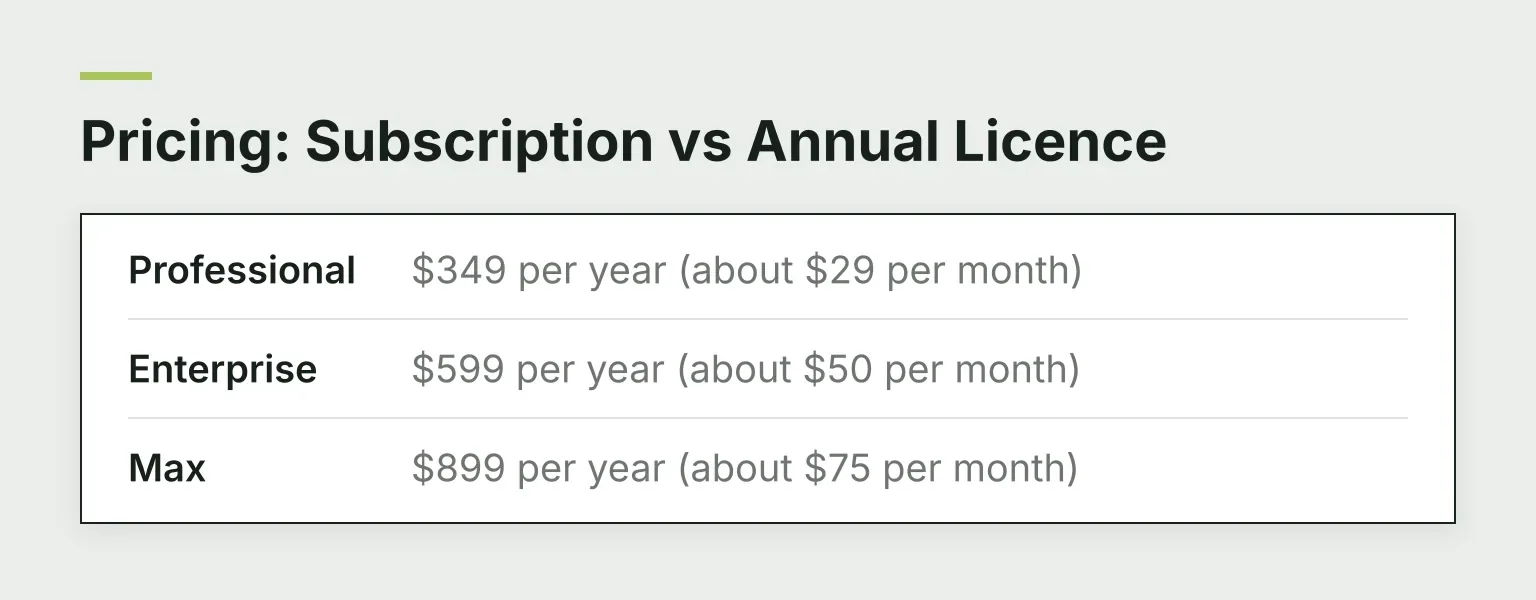
- Professional: $349 per year (about $29 per month)
- Enterprise: $599 per year (about $50 per month)
- Max: $899 per year (about $75 per month)
Two-year and three-year prepaid terms cut the rate further: $558, $1,118, and $1,498 for two years, and $717, $1,377, and $1,947 for three years.
Every paid PowerSuite plan tracks unlimited keywords and unlimited projects. That is the headline bargain. Semrush Pro caps you at 500 tracked keywords, and hitting that cap on a real site is easy.
Two honest notes on PowerSuite's pricing. First, its buy page shows crossed-out higher prices next to the real ones, but the pricing FAQ is clear that you are billed the annual price; there is no monthly plan. Second, the per-month numbers on the plan cards are the annual total divided by twelve, not a plan you can actually pay monthly.
Total cost over three years
Rough cost of the entry tiers:
| Term | Semrush Pro (annual billing) | SEO PowerSuite Professional |
|---|---|---|
| 1 year | ~$1,408 | $349 |
| 2 years | ~$2,816 | $558 |
| 3 years | ~$4,224 | $717 |
At the entry tier, PowerSuite costs roughly a quarter to a fifth of Semrush over three years. The gap narrows only if you need Semrush's higher tiers, and it can flip if you need PowerSuite's Max plan. But dollar for dollar, this is the core reason people compare the two.
Renewal and Lock-In
Both are subscriptions, whatever their marketing suggests.
- Semrush auto-renews, and its 7-day free trial converts to a paid subscription unless you cancel before it ends, per Semrush's own subscription FAQ. One detail worth knowing before the trial: data exports are disabled during the trial period, so pull what you need into notes rather than counting on CSV files. Monthly billing is available, which makes exit easy.
- SEO PowerSuite renews annually at the then-current price, billed through 2Checkout. You can cancel auto-renewal at any time through your 2Checkout account, but the refund policy states there are no refunds at any time, including for unused time left in a term.
Practical meaning: with PowerSuite, a year is the smallest commitment you can buy, so treat the free edition as your trial. With Semrush, the 7-day trial is your trial, and a calendar reminder before it ends is cheap insurance.
Data Model and Freshness
Semrush's numbers come from its own crawls and partner data: keyword volumes, backlink indexes, and competitor estimates are available the moment you search. The strength is breadth. You can look at a competitor's site you have never touched and get instant estimates.
PowerSuite collects data on demand and shows you how big the dataset behind each number is, for example a backlink index it sizes at 6.5 trillion links and a keyword database sized at 216 million terms on the pricing page. The strength is control and unlimited scale: rerun as many ranking checks as you want against as many keywords as you want. The cost is patience and consistency, because fresh numbers require your machine to run the checks.
Neither model is simply fresher. Semrush's estimates are always-on but generic; PowerSuite's checks are exactly when you run them and only when you run them.
Job by Job
Rank tracking
Semrush's Position Tracking updates rankings daily, covers mobile and desktop, and allows 500 keywords on Pro, 1,500 on Guru, and 5,000 on Business. PowerSuite's Rank Tracker handles unlimited keywords on all paid plans across hundreds of search engines (its feature table lists 400+), with competitor tracking capped at 5 per project on Professional and 40 on Enterprise. If tracking volume is your constraint, PowerSuite wins clearly.
Keyword research
Semrush has a broader, always-available keyword database with difficulty scores and competitor data built in. PowerSuite bundles roughly 20 keyword research tools that lean on live search results. For deep competitor-driven research, Semrush is stronger; for building large lists without keyword caps, PowerSuite does fine.
Site audit
Semrush crawls up to 100,000 pages per month on Pro in the cloud, according to its plan limits page. WebSite Auditor crawls on your machine, so audit size is limited mainly by your hardware, with the free edition capped at 500 URLs per project.
Backlinks
Both analyze backlinks, but from different sources: Semrush from its hosted index, SEO SpyGlass from on-demand collection. For a quick competitor backlink overview, Semrush is faster. For auditing your own profile at length without limit caps, SpyGlass is workable.
Link building and outreach
This is PowerSuite's clearest unique win. LinkAssistant offers 10+ link prospecting methods and a built-in email client, so prospecting and outreach stay in one app. Semrush has link building features, but no comparable built-in outreach inbox at these plan prices. If outreach is a core part of your workflow, this can decide the comparison on its own.
Reporting and collaboration
Semrush shares easily: anyone you invite uses the browser dashboards, and its plan limits page lists 3 scheduled PDF reports even on Pro. PowerSuite is stingier here. On Professional, reports print with watermarks and you cannot export, email, or schedule them; PDF and HTML export, white-labeling, scheduled delivery, and one-click sharing links start on Enterprise. If you serve clients, budget for Enterprise, which is the point where the $349 plan quietly becomes a $599 plan.
The Free Options
SEO PowerSuite's free edition is permanent, though limited: one project that does not save between sessions, a 500-URL crawl cap, and a small backlink allowance. It is an evaluation copy, not a working tracker, but you can test all four apps for real.
Semrush offers a limited free account and a 7-day trial of the paid plans. Use the trial to test the specific dashboards you need, and remember exports are turned off during it. The free account alone won't tell you much.
Verdict: Which One Fits You
- Choose Semrush if you work in a team, need browser access from anywhere, or spend real time on competitor research. You pay for a large hosted database and effortless sharing.
- Choose SEO PowerSuite if budget is the main constraint, you want unlimited keyword tracking, and you're comfortable with desktop apps and annual billing. Accept that reports and exports need Enterprise, and use the free edition before paying.
For a wider field of options, see our 11 best Semrush alternatives. If you're comparing Semrush against other big suites first, read Semrush vs Ahrefs and Semrush vs Ahrefs vs Moz: which to buy first.
RomeoSEO: The Third Path When Neither Dashboard Fits
Here is the pattern we see most with our own readers. Both Semrush and SEO PowerSuite are excellent at answering "what's happening?" But after the audit report lands, someone still has to rewrite the title tags, fix the thin pages, and add internal links. Small teams often stall exactly there: they buy a dashboard, and the fixes never ship.
That is where RomeoSEO comes in as an automation-first option. It connects to your site and your Search Console data, finds the pages losing traffic and the keyword and content gaps worth chasing, and then prepares the actual changes: new or improved pages, updated titles and metadata, internal links, and images. Each piece is researched against what already ranks and gets an editorial review, then lands on your site as a CMS draft or a GitHub pull request. Chat with Romeo lets you ask for changes in plain English. It's a different job than either suite: not another place to study data, but a way to get the work done from data you already own.
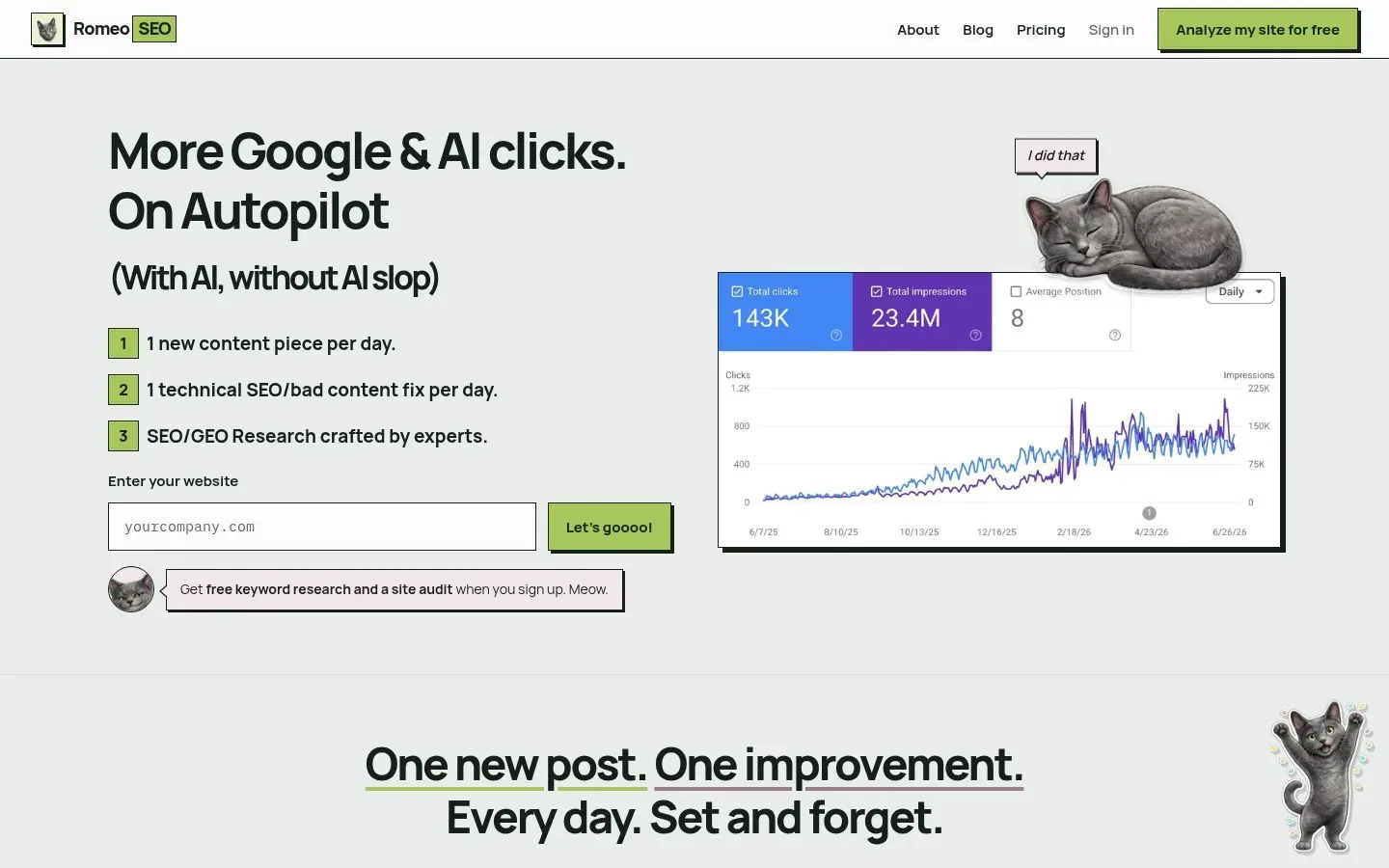
RomeoSEO's homepage. For identification only, not proof of features or prices.
If that matches your situation, see how RomeoSEO works, or start your free trial on romeoseo.com to try it on your own site.
Not sure what to measure first? Our guide to SEO analysis tools walks through choosing the right one for your stage.